
The "Noise Chart" for the AI Era
Can I Use AI? The New Classroom "Noise Chart"
Soundbytes is a weekly newsletter that explores the reality of teaching in an AI world.
Subscribe to receive it in your inbox each week.
You know the chart.
It’s usually laminated, slightly peeling at the corners, and stuck to the whiteboard with a magnet that’s seen better days.
0: Silence
1: Whisper
2: Normal Voices
3: Loud & Proud
4: Outside Voices
We use the chart because it saves us from the exhaustion of repeating “Quiet down!” forty times an hour. More importantly, it works because it’s a shared language. When every teacher in the building uses the same noise scale, students don’t have to recalibrate every time the bell rings. It’s part of the school culture.
We need a Noise Chart for AI too. The hum of schoolslop, that low-quality AI output students use to bypass the struggle of learning, is getting louder. We need a way to take the guesswork out of the room.
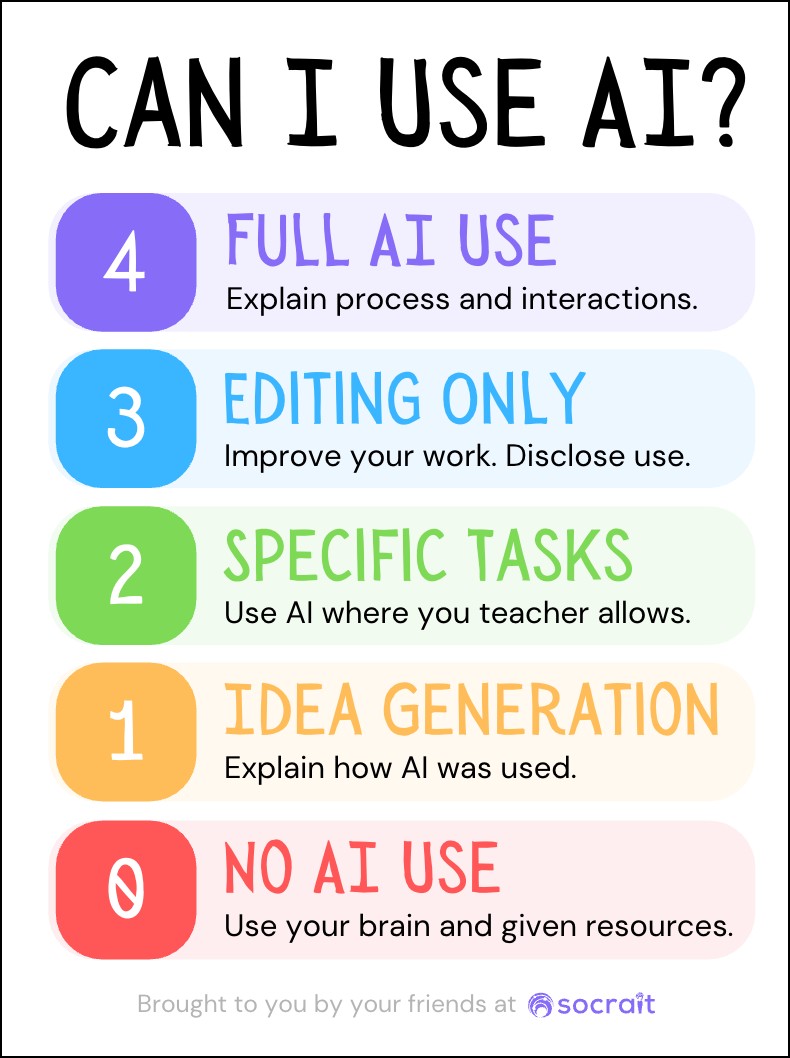
The "Can I Use AI?" Poster
In my classes, I’ve started using a 0–4 scale to communicate exactly how much “robot” I want in the room.
For example, if students are preparing for the questions peers might ask them after their presentation, I might set the room to Level 2. They can use AI to help generate possible questions, but the drafting of the answers needs to be 100% human.
Later, when they are refining their presentation slides, we move to Level 3. I want them to consider AI feedback on their layout and wording without losing sight of the rubric.
Internalizing the Standards
The 0–4 scale helps me, and it helps them too. I can’t see 30 screens at once. But the students can.
When the chart says Level 1: Idea Generation, and a student sees their neighbor’s screen churning out a full essay, they know their peer is not following the instructions. When the standard is clear, students start to guide each other: “Hey, we’re on Level 1 right now.”
Using the 4 levels for classwork and projects builds a culture of accountability that doesn’t require me to be the AI Police.
The robots aren’t going anywhere. Our job is to teach students how to think with these tools without losing their own voices.
This generation has an amazing opportunity. If they can become proficient at using AI for the “heavy lifting” – for brainstorming (Level 1), for specific tasks (Level 2), or for sophisticated editing (Level 3) – they can move toward expertise and solutions faster than any generation before them.
But moving through these levels is a complex cognitive skill. If a student just pastes an assignment into a prompt to copy the robot’s answer, they aren’t learning to write; they’re just learning to bypass the struggle. By expecting them to use generative AI in different ways at different points in the process, we are giving them a personal research assistant. We’re freeing up their brainpower to change the world, not just fill a page.
Keeping the "Noise" Down
Learning to use AI as an assistant rather than a shortcut takes intentional, frequent practice. It’s not a one-and-done conversation.
The “Can I Use AI?” poster keeps that expectation in the foreground. It’s a constant reminder that today we are prioritizing the human brain. By making the “AI Level” a part of the daily routine, as common as checking Homework on the board, we empower students to use these unimaginably powerful tools in ways that actually build their own intelligence.
Pro-Tip: If you’re using Socrait, try saying, “We’re at AI Use Level 2 for today’s assignment.” The class summary will capture that context for you automatically. If a student pushes past the acceptable use, you have a shared record of the instructions to point back to, shifting the conversation from “Why did you cheat?” to “Why did we go off-script?”
Yours in the struggle,
Maria H. Andersen
Inbox Serotonin
Socrait Tip:
Socrait summarizes and organizes your class summary after you teach, so you don’t have to try and recall it from memory after a day of teaching. Just copy and paste to share it with absent students. One teacher shared, “I just wanted to say again that I LOVE LOVE LOVE the class summary. We have a test coming up and all of the directions I gave for studying and using the review guide were right there. I copied and pasted and put it into Canvas. SO EASY!” Dr. Kayden McInnis, High School Teacher
About the author:
Dr. Maria Andersen has been an educator for 30 years in both Higher Ed and K-12 teaching a variety of subjects (math, chemistry, business, ELL, technology, pre-service teachers). She has given hundreds of workshops and keynotes about active learning, curriculum redesign, remote and online learning, effective use of technology, and using AI for teaching & learning. Andersen teaches middle schoolers at a charter school in Utah. She was also the CEO of Coursetune and is currently the CEO of Socrait.